
Trade and Transport
Sending cargo, the market, and what a cut route costs you.
Two different things
| What | Sending resources | The market |
|---|---|---|
| What it does | Moves cargo from one city to another | Posts an offer to buy or sell |
| In return | Nothing — it is a gift | Gold |
| To whom | Your own city, or another player | Anyone who can see the offer |
Sending resources
You can send resources to more than your own cities: to an ally, or to a player you have never met. Click the target city on the island map — your own city works too — and choose Send resources in the window that opens.
There is a shorter way to send to one of your own cities: the Send goods button in the Port's window opens the army screen's New order window on its Goods tab; you can also reach the same tab from the army screen. You send from the city you are in without going to the island; the Port, the ships and the rules are the same (Orders from the army screen).
Pick the city the cargo leaves from in the From chooser above the list of resources; the target city is never in that list. Each resource's line shows how much of it the sending city has (… in store). Goods you have put up for sale on the market are not counted: they are still in the store, but they are no longer yours to give. As a Pro member sending to one of your own cities, the line also says how much of it the receiving city holds (… there), and the window says how much free room its warehouse has now; if the load will not fit, you are told how much does not.
Set each amount with the slider, by typing the exact number in the box, or with the All button. The slider runs from nothing to the whole hold or everything in store, whichever is smaller; sending only that one good, a full hold puts the slider at its end. A line never goes past two limits: what the city has, and the room left in the idle transport ships once the other lines are aboard. All fills the line to the smaller of the two.
The Hold section is the ships' hold. A coloured bar shows how full it is, each resource in its own colour. Below it you see how many ships the cargo needs against how many are idle in port, and how much one ship carries.
The voyage section shows how long the journey takes. Once something is loaded it also shows the wait for the quay (if there is one), the loading time, when the ships sail and when the cargo is delivered. All of it is worked out again as you change the amounts; there is no button to calculate the route. When you are ready, Send.
If no transport ship is idle in port, the window says so; you can send once they are back. After you send, the window shows the sailing and delivery times the Port has booked for your cargo.
Ships — or carts — carry the cargo
The sending city needs a Port and enough idle transport ships to carry the load. They are the same ships that bring home what you buy on the market. Cargo that does not fit in one ship takes a second, even if the second sails half empty. Every ship belongs to the Port of the city that built it and works for that city; ships you want to use in another city you first move there. To one of your own cities on the same island, load carts can carry the cargo instead, and a cart needs no Port.
Ships and carts alike are busy for the whole round trip: they drop the cargo, come home, and can be used again only once they are home. They come back empty, unless you are a Pro member and choose a return hold.
When you send by ship to one of your own cities, the window shows After delivery, the ships: Come home is the usual way, while Stay in the destination city settles the ships there along with the goods. With the second, the ships do not come home; they become the destination city’s ships and their upkeep moves there; neither city’s population changes. One kind of ship goes: the first kind that can carry the load, the Transport Galley first and the Holkas if the galleys cannot. The window works out from the load how many ships stay; once you choose it, you see the number of ships staying, the arrival time and how much of the load the store will have no room for, all before you give the order. The order is the very one Send a fleet gives on the island map; it is described under moving ships. The choice exists only for ships going to your own city: in somebody else’s city it never appears, and with load carts selected it is greyed out, because carts always come home. A city with no Port, or one that is held, cannot take the ships in; the window says why.
The resources leave the sending city's store the moment you give the order. Cargo on the water is neither yours nor the recipient's, and nobody can spend it.
The recipient does not have to agree. There is no accept, no refuse and no step to collect the gift. The one exception is a return hold, where you ask for goods from their store in return.
Gold cannot be sent. Gold is not kept in a city's store; it is your whole empire's single treasury, and it goes neither aboard a ship nor onto a cart. The window only offers lines for resources that are kept in a store.
Ships that don't come back empty
If you are a Pro member, you can tick Don't come back empty when you send goods: the ships or carts bring goods back from the far city. A slider appears for each good; you choose what share of the carriers' whole hold that good fills. The shares go up in fives and cannot add up to more than 100%: say 60% grapes and 40% marble, and the whole hold comes back full. If the far city has less of a good than that, what it has comes.
Sending to your own city needs no consent. The goods to bring back are set aside in the far city's store at once: they stay in the store but cannot be spent. Room for them is kept in the sending city's store too, so nothing that comes back is lost. When the ships reach the far quay they first take on the return hold, then unload their own cargo.
To bring goods from another player's city you need their consent. The moment you send, your goods leave your store and wait with the request; the ships do not sail yet. The other player sees the request under On the road: what you are sending, what you ask in return, and how much would leave their store if they accept. If they Accept, the ships sail from your Port at that moment and the return hold is set aside in their store. If they Decline, if you Withdraw the request, or if no answer comes within 24 hours, your goods go back to your store. If your ships are not ready when the answer comes, the request closes and the goods go back too. Whatever the answer, a line appears in your Activity.
You still cannot see the far city's store. For each good you ask from another player, the window shows the most that could come, not how much will; you read how much came in the line that tells you the answer.
The return hold of a shipment you recall on the way is released: the far city's goods can be spent again, the room kept in your store is free again, and the ships bring their own cargo back.
Every new hull costs a little more
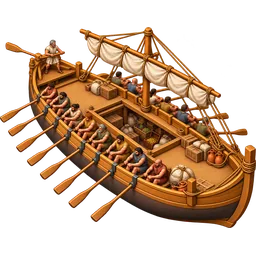 Holkas
Transport ships and load carts cost Wood and Gold. The price is not fixed: the more carriers you own, the more each next one costs than the one before. As a fleet grows, good timber has to come from farther away and shipwrights charge more; pitch, sailcloth and wages are paid in Gold. The window shows the price of the next ship and how many you own, and the whole price of an order sits under it. Your first few carriers ask no Gold, so that a new city can put ships in its harbour too; the Gold starts with the ones after them.
The count takes in everything you own: ships standing in your cities, at sea, with armies, stationed with an ally, and those still being built. An order is counted the moment you give it, and its price is fixed then. Disband a ship or lose one and the next price falls. Cancelling a batch gives back a share of what those very ships cost, and the Gold goes back to the treasury. Disbanding returns no Gold, only a share of the wood in the first price, so building and disbanding never pays. Past a certain size, even a single carrier costs more than your warehouse can hold; then you can enlarge the warehouse or shrink the fleet, and a smaller fleet lowers the price of the next carrier.
The Holkas is one step on the same ladder as the transport galley, at three times the price. It carries far more, sails slower, and needs a high enough Port. Carts have a ladder of their own: building carts does not raise the price of ships.
The game picks the ships for a cargo or an army, by one fixed rule. A fleet sails at the pace of its slowest ship, so the galleys sail alone when they can carry the load; only when they cannot do the Holkas join, and the fewest ships that carry it are chosen. A Holkas therefore never slows a voyage the galleys could have made, and a fleet with a Holkas in it sails at the Holkas's pace. Ships you move to another of your cities are always galleys; a Holkas stays in the Port that built it.
Load carts on one island
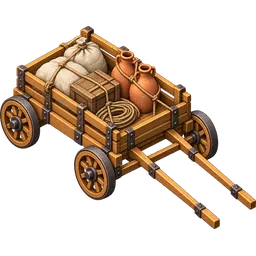 Load Cart
When the goods go to one of your own cities on the same island, load carts can carry them instead of ships. If the sending city has an idle cart, the window offers a Carrier choice: Galleys or Load carts, each with how many are idle. Choose the carts and the hold and the counts become the carts'. Cargo for another player or another island goes by ship only. When you found a colony on an empty plot of the same island, the settlers' cargo can go by cart too (Colony).
A cart takes the road. It needs no Port, and there is neither a queue for the quay nor any loading: it sets off the moment you give the order. How long the road takes depends on the cart's speed, the distance between the two cities and the world's speed. A cart holds as much as a transport ship; cargo that does not fit in one cart takes a second. A city without a Port can send its goods this way too.
Carts too are busy for the whole round trip, and they are the very carts your armies use: a cart carrying goods cannot go on a raid or be disbanded, and a cart out on a raid cannot carry goods. The arrival is the same as a shipment by sea: the cargo goes into the store, what does not fit is lost, and the same lines reach your Activity. You follow carts on the road on On the Road and on the Army screen, and you can recall them.
No cart crosses a front line. If a battle is being fought at the sending or the receiving city, or someone else holds that city or its harbour, no cart sets off; the window says why. Goods go to or from such a city by ship only.
The Port first, then the sea
The ships do not put to sea the moment you give the order. The cargo is first loaded at the sending city's Port: a bigger load takes longer, and a higher Port level makes it quicker. Every order that sends cargo out of the same city uses the Port in turn; if the Port is loading something else, yours waits its turn. The Quay section of the Port's window shows what is being loaded right now, what waits behind it, and when each of them sails. For a city that trades a lot, raising the Port gets cargo on its way sooner; the moment the upgrade finishes, the loads already on the quay and those waiting their turn speed up too. Soldiers bound for the pirate cove from a city with no War Harbour also board at the Port and appear on the Quay; an upgrade does not change their departure time, and the cargo behind them loads once the army sails.
When loading is done the voyage begins. How long it takes depends on the distance between the two cities and on the speed of the world. Nothing teleports.
There is no wait at the far end. The moment the ships arrive, the cargo is in the recipient's store; the recipient's port neither speeds delivery up nor slows it down.
The wait and sailing time the window shows are an estimate: an order given before yours may take the quay first. What counts is the time the Port books at the moment you send. If the Port goes up a level in the meantime, the ships sail before that time, never after it.
Arrival
The moment the cargo arrives it appears in the recipient's Activity: which city it came from, how much the store took, and how much — if any — was lost for lack of room. If you sent it to your own city, you are the one who reads it.
If you sent it to another player, a line reaches your own Activity too when the load arrives at their city: which city, to whom, and what you sent. It does not say how much their store took; only the recipient sees that. Another line follows when your ships are home. While they sail, you follow your ships and their cargo on On the Road and on the sending city's Army screen.
A shipment reserves no room in the recipient's store. Whatever space is free when the ships land is what comes ashore, and what does not fit is lost. The sender gives the whole load either way; a gift is given, not lent.
It is a hard rule, and there is a reason for it. Turning a shipment away for lack of room would tell the sender how full the recipient's store is. Another player's store is closed to you, and the window does not show it. Before sending a large load to someone you do not know, tell them.
This has a consequence, and it is deliberate: an unwanted gift can fill your store, and in a full store your own production is lost too. There is no setting that refuses incoming cargo; the answer is to spend what arrived and make room.
Little else happens on the way: no tax, no commission, no losses at sea. The one exception is the pirates: they may ambush a shipment sailing between islands and take a share of its cargo (Pirate Raids); the ships sail on, and what was taken waits in your pirate cove stash. A player who is on holiday, though, cannot be sent anything.
Recalling
You can recall a civilian convoy that has set out: a shipment, ships going to collect a market purchase, a colony expedition, or ships fetching cargo from a base. On the sending city's Army screen, the voyage's row says Recall. It appears only while the convoy is still on its way out; a convoy on its way back is already coming home. Transport ships you sent to stay in another of your cities are recalled the same way.
The way back is as long as it has actually sailed. Still loading in its home port, it is there at once; half way out, it comes half way back; arrived and waiting at the far quay, it sails the whole way back. Waiting is not sailing. A convoy you recall while it is loading gives up its place in the Port's queue too: whatever waits behind it moves up by that much.
Whatever is aboard comes home. If your store is full, what does not fit is lost by the same rule that applies on arrival. When the ships of a recalled shipment are home, the line in Activity says what came back aboard, how much the store took and how much was lost.
What has happened is not undone: a voyage that has picked up, delivered, or founded its city cannot be recalled.
Moving ships to another city
You can move transport ships from one of your cities to another. On the island map, click the city they should go to and choose Send a fleet. At the top of the window you pick the city they sail from; below it you see how long the voyage takes and when the ships arrive. Under Ships, transport ships have a row of their own: choose how many go with − and +, or take them all with All. The window opens with every idle transport ship chosen. You can send at most as many as lie idle in the sending Port: ships that are loading, at sea or away with an army do not count. If warships lie idle there too, the same order can send them, or transport ships alone. To count the load yourself or to send the ships empty, use Send a fleet on the island map.
The ships can sail empty or carry a cargo. Under Hold, each resource has a line; set it as in the Send resources window, with the slider, the box or All. The hold is the holds of the ships you send put together, and the sliders stop when it is full. Take ships away and whatever no longer fits comes off the lines; Reset empties the cargo and leaves the ships alone. As a Pro member, if a resource will not fit in the destination’s store, its line says how much room there is and how much will be lost; you can still give the order. Without Pro the window says Pro shows this. At the foot of the window you see the order in brief, when the ships arrive, and Send the fleet.
The voyage is a shipment's voyage: any cargo is loaded at the Port first, then the ships put to sea. While they sail they are of no use to either city. You follow them on On the Road in a Transport ships row, and can recall them; recalled ships come home with their cargo. Warships sent in the same order go as their own fleet, at their own speed.
When the ships arrive, the cargo goes into the destination's store; whatever does not fit is lost, just as with a shipment. The ships do not sail home: they stay in the destination's Port and are that city's ships from then on. Their upkeep moves to that city with them. Neither city's population changes: the crews left the city's citizens when the ships were built. Activity tells you how many ships arrived and how much of the cargo went into the store.
Transport galleys and Holkas cost upkeep: in port or under way, each takes a little Gold from your treasury every hour, the Holkas a little more than the galley. Keeping a great fleet thus has a price. A small fleet does not pay it: the first ships you own cost nothing to keep, and only the ships beyond them are paid for. The galleys are counted as free first, then the Holkas, and the screens show the Gold that really leaves the treasury. A ship still being built costs no upkeep until it is finished. Load carts cost no upkeep.
The destination must be your own city, with a Port, and held by nobody. If its Port is pulled down while the ships are at sea, or somebody starts holding the city or its harbour, the ships do not go in: they sail home the way they came with everything aboard, and Activity tells you why. Transport ships cannot leave a city whose harbour a hostile fleet holds for another Port.
The market
Every offer in the world stands on the book, but a trade happens only when the seller is within the buyer's reach. That reach is set by the Trading Post in the buyer's city. Raising your own widens whom you can buy from; whom you can sell to depends on the buyer's reach, not on yours. It also sets how many sell offers your city may keep standing at once; buy orders do not count towards it. Lower the Trading Post and your standing sell offers are not removed, but you cannot make a new one until they number fewer than the new limit.
On the market screen you first choose a resource; each resource's card shows how much of it your city holds and how many offers stand on its book. One side of the book lists sellers from the cheapest, the other buyers from the highest. Your own offers are marked yours; you cannot trade with yourself. Press a line and its price goes into the order form. The form shows what the order will tie up: for a buy, the Gold set aside, the ships that sail and the room in the warehouse; for a sell, the Gold you receive and the goods reserved. Most writes the largest quantity that would go through right now.
If your Gold falls short, if you do not have the goods, or if your sell offer places are full, the order cannot be placed and the form says why. If your idle ships or your warehouse cannot take it all, the order is still placed: what they can take is matched and comes home, and the rest waits on the book. If the order matches several offers at once, the goods you buy from one city come on a single voyage, with ships counted for their total; goods from another city come on a voyage of their own. Whatever of the order matches later comes on a voyage of its own too. Lower down, Your offers shows your open offers, how much of each has filled and a Cancel button; closed offers wait in a folded list. Deliveries shows the voyages at sea and the ones that have landed.
Nobody accepts an order: when price and reach allow, the match happens by itself. The book shows which offers that is true for. Sellers out of your reach are faded, with how far away they are; when only part of a price line is in reach, the two parts are shown separately. On the buyers' side, buyers whose reach does not cover your city are marked: they cannot take your goods, and your own Trading Post level does not change that. The line says how far the nearest such buyer is and how far its reach extends; the gap closes only if that buyer raises their own Trading Post. The cheapest seller the form names, and its word on whether the order matches at once, count only offers within your reach; if the sale at the price you typed is out of reach, the form says so before you place the order.
A buy that does not match at once waits on the book. It matches by itself when someone within its reach offers to sell at that price or less, and it is tried again when your ships come home. A waiting buy grows with its city's reach: when a new Trading Post level is finished, the city's waiting buys reach as far as the post now does. If someone who has just come within reach sells at the buy's price or less, the buy matches them by itself and you pay the seller's price. Lowering or demolishing the Trading Post never shrinks a waiting buy's reach. In Your offers, a waiting buy with nobody in reach selling at its price says so, and says how far away the nearest seller is.
Gold waiting in a buy order is not safe from raiders. When one of your cities is raided, the raider's share of Gold is worked out over your treasury and your buy orders together. If the treasury is not enough, the rest comes out of your orders, starting with the buy you placed most recently, and they shrink by as many units as the Gold taken (Raiding). Goods in a sell offer are not safe either: they stay in your store, and if the free stock is not enough the raider takes the rest from your newest sell offer, which shrinks to match (Raiding). Your offers says how many units a raid took off an order; an order that loses all its units shows as closed by a raid.
Goods you bought on the market stay yours even if you recall your ships: the Gold went at the match, and the goods wait for you on the seller's quay. The market screen lists them under Purchases waiting, at the top of Deliveries; Send ships puts out a new convoy that brings them home. Purchases of one resource waiting on the same city’s quay show as one line and come home on one convoy; if your idle ships cannot take them all, those that fit come and the others wait, never split. One purchase has one convoy at a time. Recalling cancels the voyage, not the sale — you cannot have the money back and the goods too.
War breaks trade
This is the most fragile part of your economy. If your grapes come from another island and that route is cut, your storeroom empties — and an empty storeroom means falling happiness and a shrinking city.
The real cost of a siege is usually not the soldiers you lost. It is the trade that stopped.
An occupied city does not stop trading, but it is limited: resources leaving it and reaching it use the city's civilian transport allowance. Your shipments, the deliveries of your market orders and your colony fleets all draw on it. It is charged once, as the cargo sets out, and refills by itself over time; when it cannot cover a load, the window says so and when the load could go. A gift another player wants to send to that city is refused before it sails. → Occupation
A city whose harbour is held uses the same allowance. Even when its streets and its harbour are held separately there is one allowance, charged once as the cargo sets out. → Port Occupation
The figures come from the game's own content. Balance updates can move some numbers; the rules themselves are as written here.